Shell Scripting Challenge: Day 01

I like to explore the technology in DevOps area where I write blog about my learning each day on the tools that is mostly used in Industries for DevOps practices. You can go through my blogs and reach me out in LinkedIn for any suggestions.
Task 1: Comments
In bash scripts, comments are used to add explanatory notes or disable certain lines of code. Your task is to create a bash script with comments explaining what the script does.

Task 2: Echo
The echo command is used to display messages on the terminal. Your task is to create a bash script that uses echo to print a message of your choice.

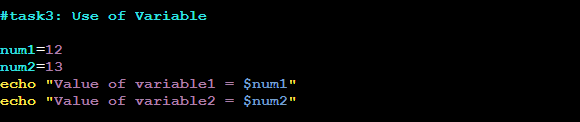
Task 3: Variables
Variables in bash are used to store data and can be referenced by their name. Your task is to create a bash script that declares variables and assigns values to them.
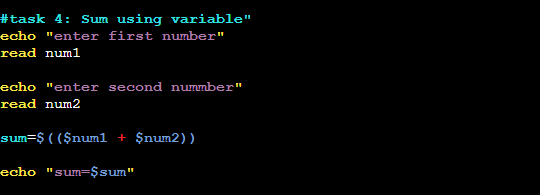
Task 4: Using Variables
Now that you have declared variables, let's use them to perform a simple task. Create a bash script that takes two variables (numbers) as input and prints their sum using those variables.
Task 5: Using Built-in Variables
Bash provides several built-in variables that hold useful information. Your task is to create a bash script that utilizes at least three different built-in variables to display relevant information.

Task 6: Wildcards
Wildcards are special characters used to perform pattern matching when working with files. Your task is to create a bash script that utilizes wildcards to list all the files with a specific extension in a directory.

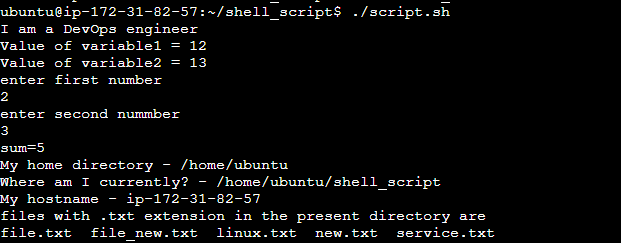
Output:
Thanks to all for the support.
You can follow me on LinkedIn for my daily updates:- linkedin.com/in/bandan-kumar-sahoo-131412203


